Your memory has limits.
NxtReply doesn't.
NxtReply is your second brain for every conversation that matters — clients, customers, candidates, or just people you don't want to forget. It remembers what was said in every chat and email, and writes replies in any textbox on the web. Built for solo users and teams alike.
Free forever after trial · No credit card required · 7-day Pro trial included
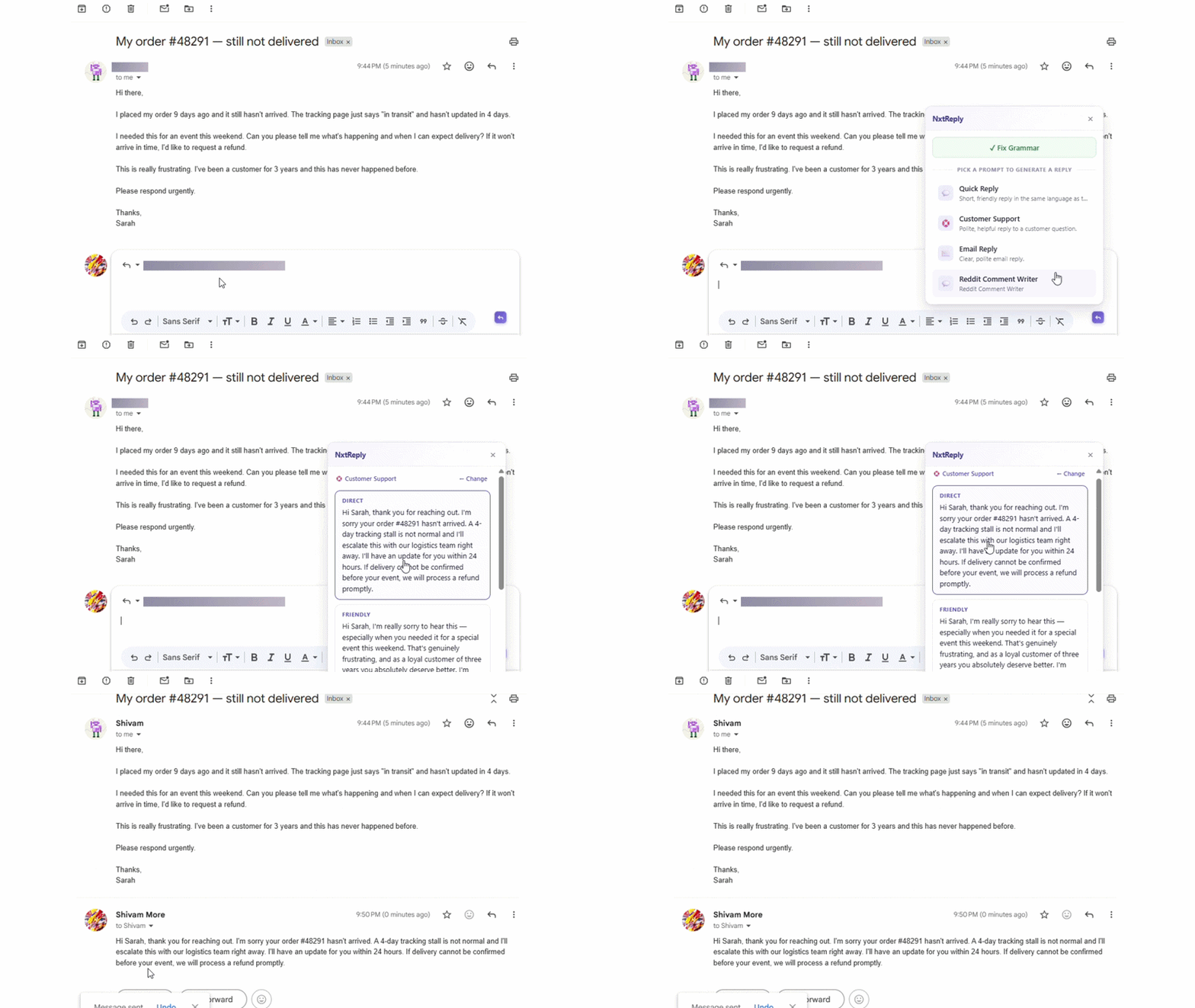
Remembers conversations everywhere they happen
The platform
Three products. One second brain.
A memory layer for every person and conversation — fed from your calls, your chats, and every reply you send. Works the same whether it's just you or your whole team.
THE MEMORY LAYER
Every person. Every conversation. Never forgotten.
Paste a chat, end a call, or add a note — NxtReply auto-links it to the right person (and company, if there is one), extracts budget, pain points, and decisions, and makes it all searchable in plain English. This is the part that makes it a second brain, not a reply tool.
Ask Anything across your entire history
CAPTURE EVERYWHERE
Reply faster, anywhere you type.
The purple N badge appears in every textbox — Gmail, WhatsApp, LinkedIn, Notion, and thousands of other sites. Pick a prompt, get 3 replies, paste in one click — every reply you send feeds the same memory.
Works on every website with a text input
Features
A second brain, built from how you already work
Conversation Intelligence
Ask your own history anything.
Every conversation — chat, email, meeting note — lives in one timeline per person (and the company they're part of, if any). NxtReply automatically extracts budget signals, pain points, and decisions. Then Ask Anything lets you search your entire history in plain English, like having a photographic memory of everyone you talk to. This is the core of NxtReply — everything else just feeds it.
- Company → Contact → Conversation data model
- Auto-extracts intel from every chat
- Ask Anything search across all your history
- CSV import for bulk setup
Chrome Extension
One badge. Every website. Every reply remembered.
Click into any comment box, email, or DM and the NxtReply badge appears. Build a small library of prompts for the replies you send most. One click generates three options tuned to the conversation around your cursor. Pick the one that fits, paste, done — and it's part of your conversation history too.
- Universal — every textbox
- Grammar fix with diff preview
- Replies match the conversation language
- Private by default — content never stored
Use cases
Built for everyone who can't afford to forget a conversation.
Whether you're a team or just one person, your second brain grows with every call, chat, and reply.
Sales & Account Execs
Every deal, call, and follow-up remembered automatically. Ask "What did Acme say about budget?" and get the answer instantly — no digging through notes or old emails.
Customer Support
See a customer's full history the moment they message — past calls, past issues, past promises — and reply to repeat questions without retyping the same answer.
Freelancers & Consultants
Never lose track of a client's scope, budget, or last decision again. Polish emails and proposals in seconds, backed by a memory of every conversation you've had with them.
Recruiters & Job Seekers
Keep every candidate or hiring conversation organized by company and contact, and answer recruiters or candidates confidently, in your own voice.
Creators
Engage hundreds of YouTube and LinkedIn comments while keeping every reply on-brand.
Just for yourself
No team, no company, no problem — track your own calls and chats with landlords, doctors, schools, or anyone else you don't want to keep re-explaining things to.
Anyone who talks to people for a living
If you've ever said "wait, what did we agree to?" — NxtReply remembers so you don't have to.
How it works
Set it up once. Let the memory build itself.
No onboarding wizard. No five-minute tour.
For Conversation Intelligence (the second brain)
Add a company & contact
Create one manually, import a CSV in bulk, or just let it happen automatically the first time you reply, chat, or call.
Paste a chat, end a call, or drop a note
NxtReply links it to the right company and contact, then auto-extracts budget, pain points, and decisions — no manual tagging.
Ask Anything across all of it
"What did Acme say about budget?" Type the question in plain English and get the answer instantly, sourced from your real history.
For the Chrome Extension
Install the extension
One click from the Chrome Web Store. Sign in with your NxtReply account. Three starter prompts come pre-loaded.
Pick or create your prompts
Build a small set of prompts for the replies you send most. Edit, delete, or write your own. They follow you to every website.
Click the badge, pick a reply
A purple N appears in any textbox you focus. Click it, choose a prompt, and three replies are generated from the conversation around your cursor.
Pricing
Pay for what you use, not what you don't.
Credits are how every reply is metered. Free users get 5 reply credits per day; paid plans get a monthly pool. Top up any time. Cancel any time.
Free
Try NxtReply every day — no credit card needed.
- 7-day Pro trial: 1,200 replies with premium AI quality. Then free limits apply.
- 5 / day replies
- 15 / day grammar fixes
- 10 / month Ask Anything
- Standard AI quality
- Community support
- 3 saved prompts
Starter
$204 billed annually · $20/mo if monthly
For individuals who reply at scale every day.
- 400 / month replies
- Unlimited grammar fixes
- Unlimited Ask Anything
- Standard AI quality
- Email support
- Reply top-up packs available
Need a custom plan or volume seats? Contact us →
FAQ
Questions? We have answers.
What makes NxtReply a "second brain" and not just a reply tool?
The reply tool is how most people first try NxtReply, but it's one input into a bigger system: Conversation Intelligence. Every call, chat, email, or note becomes a structured record linked to a company and contact, with budget, pain points, and decisions auto-extracted. Ask Anything then lets you search that entire memory in plain English. The reply assistant feeds the brain; it isn't the whole product.
What is Conversation Intelligence?
It's NxtReply's memory layer. Every call, chat, email, or meeting is stored as a Conversation linked to a Company and Contact. You can search across all your history in plain English using the Ask Anything feature in your dashboard.
Where does the Chrome extension work?
On every website with a text input — Gmail, WhatsApp Web, LinkedIn, YouTube, Instagram, Reddit, Slack, Discord, Notion, X/Twitter, and anywhere else you type on the web.
Is my data private?
Yes. NxtReply never stores message content from your replies. Only metadata (credit usage, timestamps) is logged for that flow. Your conversations and replies are never used to train AI models.
What languages does it support?
Replies are generated in the language of the conversation — English, Hindi, Hinglish, Spanish, or any other language detected in the context.
What does the free tier include?
Every new signup starts with a 7-day trial that unlocks full Pro-level access — no credit card required. After 7 days, your account settles into the permanent free tier: 5 reply credits per day, standard reply quality, Ask Anything, AI Contact Chat, and access to the extension on every website.
What happens when my 7-day trial ends?
If you haven't upgraded, you automatically move to the free plan — 5 reply credits per day, refreshed every 24 hours. Any unused trial credits don't carry over. You'll get an email a couple of days before your trial ends as a heads-up.
How is this different from a generic AI chat tool?
NxtReply works directly inside the textbox you're already typing in — no copy-pasting to a chat window. Your custom prompts travel with you to every site. And unlike a chat tool, it remembers your conversations, companies, and contacts across every channel.
Can I cancel anytime?
Yes. Cancel from your billing page — no questions asked. Your credits remain usable until the end of your billing period.
Got a different question? Email us.